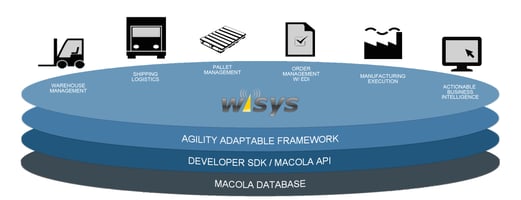

Warehouse Management Implementation That Fits How You Work When it comes to warehouse management...
ERP + WMS Integration Playbook for Faster, Cleaner Shipping
Integrating your ERP and WMS sounds simple: send orders to the warehouse, get shipments back. In reality, it’s one of the highest-leverage projects you can run—and one of the easiest to get wrong.
When ERP and WMS aren’t truly integrated, teams pay the tax every day: re-keying data, phantom inventory, mis-picks, late shipment confirmations, and month-end clean-up. This playbook walks you through how to do it right so you ship faster, reduce errors, and finally trust your data.
What readers really want from an ERP + WMS integration playbook
Most searches for “ERP WMS integration” sit between informational and commercial intent. People want clear steps, yes—but they also want practical operating rules: who owns which data, what must be real-time, what happens when transactions fail, and how to measure whether the integration stays healthy over time.
Why ERP + WMS integration pays off immediately
The fastest wins come from fewer touches and fewer exceptions. The integration should eliminate duplicate work and prevent errors from entering the system in the first place—especially at the first scan, the first pick, and the first pack.
Common outcomes teams target:
- Faster order release to the warehouse (less waiting, fewer status checks)
- Higher pick/pack accuracy (fewer wrong-item shipments and re-ships)
- Cleaner inventory and location data (less reconciliation and fewer stockouts)
- Reliable shipment confirmation + tracking updates (fewer “where is my order?” calls)
Where Wisys fits (and when it’s worth looking)
If your goal is to reduce touches and keep data consistent inside the ERP, look for tools that are designed to work in real time and minimize integration friction. Wisys positions its warehouse and fulfillment solutions around ERP-native workflows and real-time visibility—so it can be a fit when you want fewer moving parts. Explore Wisys software products or browse Wisys warehouse solutions.
Step 1: Define data ownership (the step most teams skip)
Before you map a single field, decide who owns what. This prevents “two sources of truth,” which is how inventory drifts and shipment data goes missing.
Use a simple matrix: System of Record (SoR) vs System of Action (SoA).
|
Data Object |
Typical System of Record |
Typical System of Action |
|
Item master (SKU, UOM, dims) |
ERP |
ERP (with controlled updates) |
|
Bin-level inventory |
WMS |
WMS |
|
Sales/transfer orders |
ERP |
ERP → WMS executes |
|
Allocations/reservations |
ERP or WMS (choose one) |
Chosen owner |
|
Shipments (cartons, carrier, tracking) |
WMS |
WMS → ERP confirmation |
|
Inventory adjustments/cycle counts |
WMS (details) + ERP (financial) |
WMS |
Tip: write the ownership rules down, and add “tie-breaker” logic for conflicts (e.g., which timestamp wins, who can edit ship method after release, how holds are handled).
Step 2: Decide what must be real-time vs batch
Real-time everything is rarely necessary. Use real time for flows that change what you can promise a customer today. Use batch for low-urgency master data refreshes and historical sync.
Good candidates for real time:
- Order release to the warehouse (and status updates)
- Inventory availability changes that affect selling
- Shipment confirmation + tracking write-back
- Exceptions that block flow (short picks, holds, backorders)
Good candidates for batch:
- Non-urgent item master updates (nightly)
- Historical transaction archives
- Some cost updates (depends on your costing method)
Step 3: Map the flows that actually drive faster shipping
Most ERP↔WMS projects succeed or fail on a few transaction flows. Start with the minimum viable set, then add the flows that prevent recurring exceptions.
Core flows (minimum viable):
ERP → WMS
- Item master + UOMs + dimensions/weights
- Warehouses and locations (at least warehouse-level)
- Orders to fulfill (sales, transfers)
- Order changes (qty changes, cancels, ship method changes)
WMS → ERP
- Shipment confirmation (what shipped, when, how, tracking)
- Inventory movements (receipts, picks, adjustments, cycle counts)
- Exception results (short picks, splits, substitutions if allowed)
Practical examples of “faster shipping” features that reduce touches
If you’re trying to reduce manual steps, look for warehouse execution tools that validate at the scan and push transactions through immediately. For example, mobile scanning that records transactions at the first touch point reduces re-keying and improves accuracy. Mobile data collection (handheld scanning) for Macola is one example of this pattern.
On the packing and shipping side, automating box selection and pack logic can speed up throughput and reduce errors without forcing the team to memorize packaging rules. Wisys AI Packing is positioned specifically for faster, more accurate shipping.
If parcel shipping label printing, tracking number generation, and ERP shipment confirmation are pain points, prioritize a workflow that ties validation, label generation, and ERP updates together. Agility Shipping overview describes a tightly integrated pick/pack/ship flow for Macola and SAP B1 environments.
Step 4: Choose the right integration method (API, middleware, or file)
You have three realistic options:
1) Direct API integration (point-to-point)
Best when you have strong internal dev resources, stable requirements, and limited endpoints. Risk: custom code becomes a fragile mini-product.
2) Middleware / iPaaS
Best when you need monitoring, transformations, retries, and you’re connecting multiple systems (ERP, WMS, OMS, TMS). It can reduce change friction because mappings and rules live outside the ERP and WMS.
3) Flat file / batch
Best for legacy environments or low transaction volumes. Risk: latency, harder debugging, and “yesterday’s truth.”
Step 5: Field mapping that prevents the most common errors
Treat mapping as an error-prevention exercise, not a data-transfer exercise.
- SKU identity: SKU vs UPC vs internal item number vs aliases
- UOM conversions: each/case/pallet, rounding rules
- Carrier + service codes: consistent ship method mapping
- Addresses: validation rules and international formatting
- Weights/dimensions: cartonization and rate shopping depend on it
- Lot/serial: lifecycle rules (create, pick, return, quarantine)
Step 6: Design for failures (so a glitch doesn’t stop shipping)
Your integration will fail at some point. Plan for it.
- Idempotency: the same message can be processed twice without duplicating shipments
- Retries with backoff: automated recovery for transient issues
- Quarantine/dead-letter queue: isolate bad transactions
- Traceability: correlation IDs across ERP, WMS, and middleware
Step 7: Test the scenarios that break real warehouses
Go beyond the happy path. Test what your team actually does on busy days.
- Partial ship + backorder handling
- Split shipments across warehouses
- Order edits after release (qty change, cancel line)
- Short picks and substitution rules
- Lot/serial picking + returns
- Carrier label generation + tracking write-back
- Cycle count adjustments and reconciliation timing
Step 8: Measure integration health (so your data stays clean)
If you don’t measure it, integration quality decays quietly.
- Order-to-wave latency (ERP release → WMS actionable)
- Ship confirmation latency (WMS ship → ERP updated)
- Transaction failure rate by flow
- Inventory sync variance (ERP vs WMS by warehouse)
- Pick/pack accuracy rate and exception rate
ERP-specific fit checks (Macola vs SAP Business One)
If you’re on Macola or SAP Business One, confirm the warehouse tools you choose support your workflows and data structures natively. Wisys has dedicated overviews for Macola users and SAP Business One users, which can help you quickly validate fit and priority use cases.
FAQ
What is ERP WMS integration?
ERP WMS integration connects your ERP system with your warehouse management system so orders, inventory, and shipment data sync automatically between financial planning and warehouse execution.
What data should sync between ERP and WMS?
At minimum: item master, warehouses/locations, orders, shipment confirmations, and inventory movements (receipts, adjustments, cycle counts). Add lot/serial, UOM conversions, and reason codes for stronger auditability.
Should ERP and WMS sync in real time?
Use real time for order release, inventory availability that impacts selling, and shipment confirmations. Use batch for lower-urgency master data updates and historical syncing unless your operation requires continuous visibility.
What’s the biggest cause of ERP WMS integration failures?
Unclear source-of-truth rules. If both systems can change the same data (like inventory or allocations) without governance, you get drift, duplicates, and constant reconciliation.
Is iPaaS worth it for ERP WMS integration?
Often yes when you need monitoring, transformations, retries, and multiple system connections (OMS/TMS/eCommerce). It can also make future changes easier because you update rules in one place.
How do you keep inventory accurate after integration?
Define ownership rules, standardize adjustment reason codes, reconcile timing (when ERP updates), and monitor ERP-vs-WMS variances. Pair that with cycle counting and exception reporting.